 微信关注,获取更多
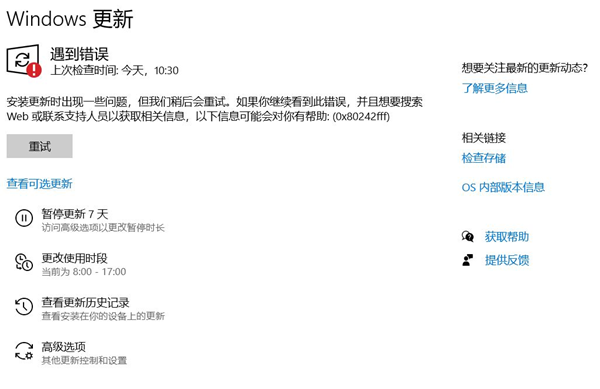
 最近有用户进行执行win10系统更新的时候,出现0x80242fff错误码,有一个更新无法执行,如下图所示,那么Win10系统更新时出现0x80242fff错误代码怎么办?该如何解决呢?
Win10系统更新时出现0x80242fff错误代码怎么办?
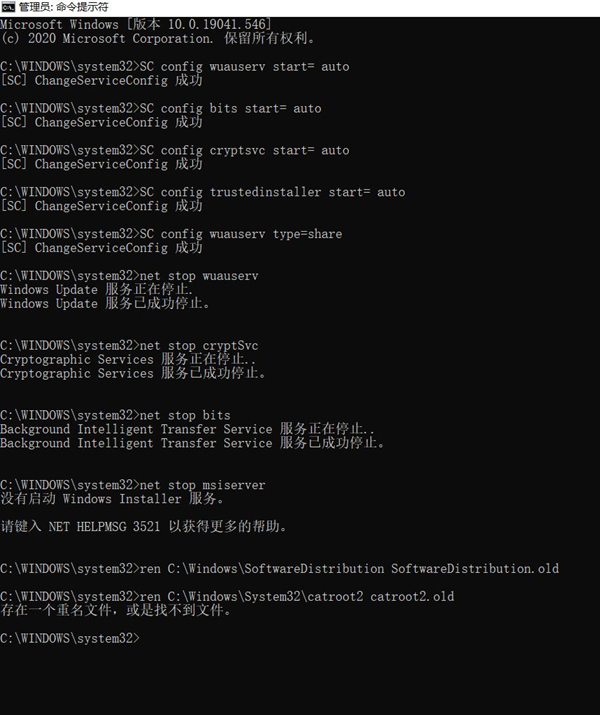
1、左下角搜索cmd,之后以管理员权限打开;
2、输入以下命令;
- 01SC config wuauserv start= auto
- 02SC config bits start= auto
- 03SC config cryptsvc start= auto
- 04SC config trustedinstaller start= auto
- 05SC config wuauserv type=share
复制代码
SC config wuauserv start= auto
SC config bits start= auto
SC config cryptsvc start= auto
SC config trustedinstaller start= auto
SC config wuauserv type=share
3、然后输入;
- 01net stop wuauserv
- 02net stop cryptSvc
- 03net stop bits
- 04net stop msiserver
- 05ren C:\Windows\SoftwareDistribution SoftwareDistribution.old
- 06ren C:\Windows\System32\catroot2 catroot2.old
- 07net start wuauserv
- 08net start cryptSvc
- 09net start bits
- 10net start msiserver
复制代码
net stop wuauserv
net stop cryptSvc
net stop bits
net stop msiserver
ren C:\Windows\SoftwareDistribution SoftwareDistribution.old
ren C:\Windows\System32\catroot2 catroot2.old
net start wuauserv
net start cryptSvc
net start bits
net start msiserver
4、之后,重新启动一下。
未经允许不得转载:系统吧-电脑系统大神 » Win10系统更新时出现0x80242fff错误代码怎么办?