 微信关注,获取更多
 Soft AP就是软AP,硬件部分是无线网卡,因为成本较低,不少人会选择使用Soft AP,在Ubuntu系统中,需要手动开启Soft AP功能,下面小编就给大家详细介绍下Ubuntu开启Soft AP的方法。
启动方法:
1.查看采用的无线网卡是否支持Soft AP:
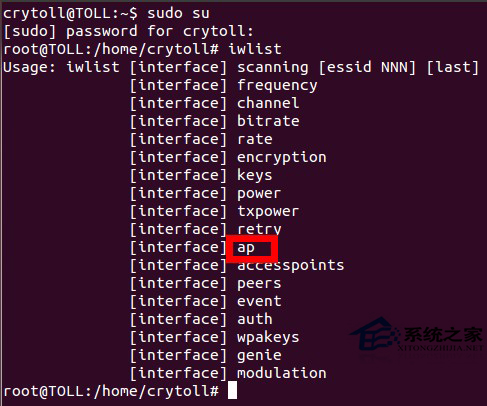
注意,可以看到有AP字样,表明支持。
2.安装hostapd后编辑器配置文件:
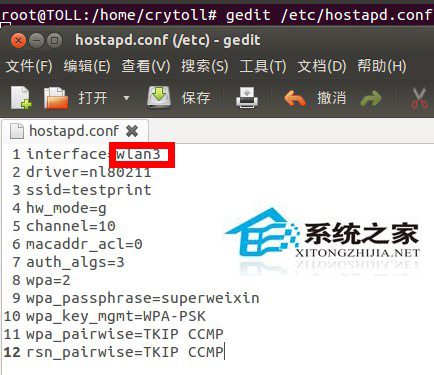
3.安装dnsmasq后配置:
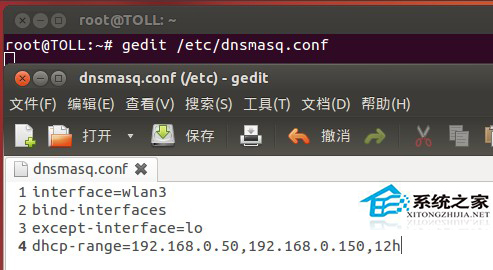
4.启动dnsmasq:
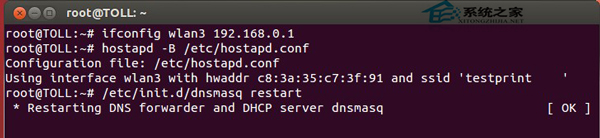
上面就是Ubuntu开启Soft AP功能的方法介绍了,在开启前,先要确定你的无线网卡是否支持Soft AP,然后再安装dnsmasq,开启Soft AP只需四步。
未经允许不得转载:系统吧-电脑系统大神 » Ubuntu系统启用Soft AP的方法