 微信关注,获取更多
 Zypper是SUSE Linux下用于管理软件的程序,拥有多种功能,那么Linux下要如何使用Zypper命令来管理软件呢?下面小编就给大家介绍下SUSE Linux使用Zypper命令的方法,感兴趣的朋友可以来了解下。
Zypper是SUSE Linux中用于安装,升级,卸载,管理仓库、进行各种包查询的命令行接口。本篇将会讨论zypper的几个不同命令的例子。

语法:
# zypper [–global-opts] 《command》 [–command-opts] [command-arguments]
中括号中的部分可以不需要。执行zypper最简单的方法是输入 zypper 及 。
例子1:列出可用的全局选项和命令
打开终端,输入zypper并按回车,它会显示所有可用的全局选项和命令。
linux-xa3t:~# zypper
例子2:获得zypper的某个命令的帮助
语法: zypper help [command]
linux-xa3t:~# zypper help remove
remove (rm)[options]《capability》。。.
Remove packages with specified capabilities.
A capability is NAME[.ARCH][OP《VERSION》],where OP is one of 《,《=,=,》=,》。
Command options:
-r,–repo 《alias|#|URI》Load only the specified repository.
-t,–type 《type》Type of package(package, patch, pattern, product)。
Default:package.
-n,–name Select packages by plain name,notby capability.
-C,–capability Select packages by capability.
–debug-solver Create solver test casefor debugging.
-R,–no-force-resolution Donot force the solver to find solution,let it ask.
–force-resolution Force the solver to find a solution (even an aggressive one)。
-u,–clean-deps Automatically remove unneeded dependencies.
-U,–no-clean-deps No automatic removal of unneeded dependencies.
-D,–dry-run Test the removal,donot actually remove.
例子3:打开zypper shell/会话
linux-xa3t:~# zypper sh
zypper》
或
linux-xa3t:~# zypper shell
zypper》
例子4:列出已定义的仓库
linux-xa3t:~# zypper repos
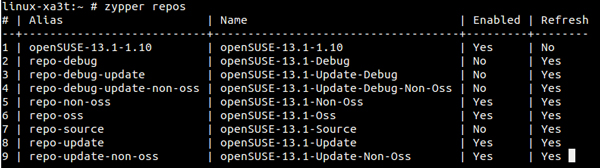
或
linux-xa3t:~# zypper lr
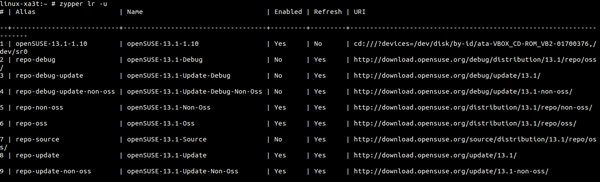
4.1) 以表格的形式列出仓库的URI
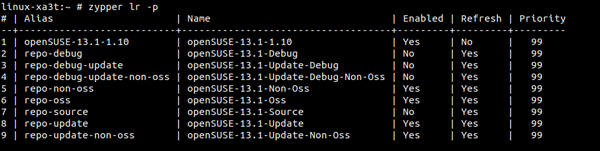
4.2) 以优先级列出仓库
linux-xa3t:~# zypper lr -p
未经允许不得转载:系统吧-电脑系统大神 » SUSE Linux系统中zypper命令用法汇总